LOCAL AUDIO-TO-MIDI CONVERTER
WAV to MIDI.
Convert your WAV recording into editable MIDI notes.
Choose a file below, compare the result, then download your MIDI.
01 Your audio
Up to 50 MiB per file. Supported formats depend on your browser.
Still not working? Let us know
Recordings use Melody unless you choose a mode. You can re-analyze the same audio after conversion.
Waveform scaled for visibility; playback volume is unchanged.
02 Your MIDI
WAITING FOR AUDIOYour MIDI preview will appear after conversion.
, or tell us about it.
Notes look wrong?
Result not right? Tell us what you tried
One Type 0 MIDI track · 120 BPM · 960 PPQ · original timing, no beat quantization. Chords stay as overlapping notes; instruments are not split into separate tracks. Check import timing and track structure. Delete or shift individual notes here before downloading; use an external music app for more detailed editing. Follow the solo voice walkthrough for a real recording and a local error to inspect.
Shape the notes Filter & transpose
Changes update your MIDI instantly. No need to analyze again.
Convert WAV to MIDI in three steps
Choose your mode and file
Use Melody for one voice or a solo instrument, or Polyphonic for chords and overlapping notes. Select your WAV above; conversion starts automatically.
Listen and adjust
Compare Original audio with MIDI at the same passage. Filter short fragments, delete an unwanted note or shift its pitch. Undo is available before download.
Download MIDI
Save the .mid file and open it in your music app. MIDI contains note events, rather than the recorded sound. The result uses one track and a fixed 120 BPM time base; tempo is not detected.
Free, no account required. Audio stays on your device. Files: up to 50 MiB; Melody: up to 10 minutes; Polyphonic: up to 5 minutes. Neither mode separates instruments. Dense mixes can produce extra or missing notes.
Check the result before using it
If a solo recording returns no notes, try Melody and lower its quiet-note filter. If short fragments appear, raise minimum note length gradually and compare the same passage. Filters can remove wanted notes too. Missing notes and timing edits need an external editor.
For an import that sounds too fast or slow, check the 120 BPM time base. Chords remain overlapping pitches in a single track; see track and channel limits.
WAV to MIDI FAQ
Do I need to turn WAV into MP3 first?
No. Select the WAV directly in the converter above. Browser decoding support depends on its codec; renaming a file extension does not change the audio encoding.
Does my recording leave this device?
No. Audio is processed locally. The chord model downloads to your browser when needed. The tool tries to save your latest audio and result locally; use Delete saved result to remove that copy. Optional analytics loads only with your consent and receives no audio or filenames. Privacy policy.
Will MIDI keep the original instrument sound?
No. MIDI stores pitches, timing and note events. Preview uses a synthesized sound; choose an instrument in your music app after importing. A full mix is not separated into independent instrument parts.
Archived experiment and downloadable test files
These historical controls are optional reference material. Their dates and engine versions are retained; they do not measure the current converter or real-music accuracy.
Archived test: one WAV, three settings
Historical results — September 25, 2026. The counts, diagram and MIDI files below belong to the previous single-melody detector. Today's two modes use a 40 ms default minimum and may produce different results. These files are preserved as an experiment record, not current accuracy claims.
We generated a short test specifically for this guide and ran it through the live site in a desktop Chromium browser. It contains sixteen separate tones: MIDI pitches 60, 62, 64, 65, 67, 69, 71 and 72, repeated twice. Each tone lasts 160 milliseconds, followed by 40 milliseconds of silence. The complete file lasts 3.2 seconds.
This is deliberately simple synthetic audio, not a voice, guitar, piano or commercial recording. Its purpose is to make a filter experiment repeatable. It does not measure accuracy on real music.
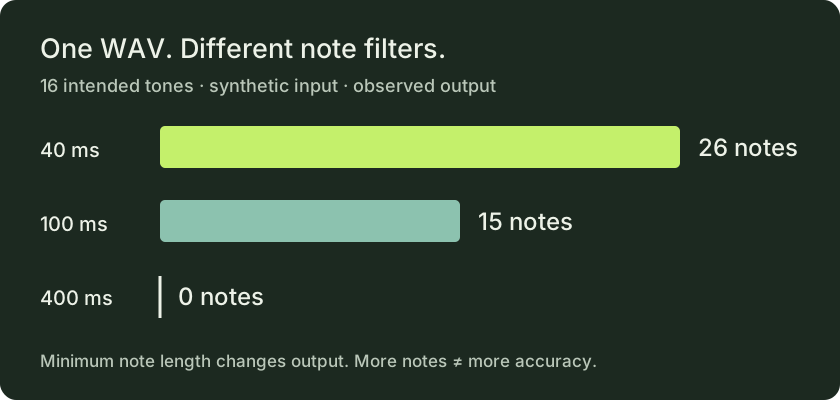
| Minimum note length | Detected notes | What to check |
|---|---|---|
| 40 ms | 26 | Output exceeds the sixteen intended tones. |
| 100 ms | 15 | Output falls short of the intended count. |
| 400 ms | 0 | The tool reports no notes at these settings. |
The input did not change between these runs. Only the minimum note length changed. At the shortest setting, more short detected segments survive. At the longest setting, none survive. The former 100 ms default was closer in count, but a count alone cannot establish that the pitches or timing are correct. We do not label any of these results a perfect transcription.
These results are a useful warning against moving every control upward or downward in search of an automatic fix. A lower threshold can retain useful short notes and unwanted fragments at the same time. A higher threshold can remove both. Listen to the section you are fixing and look at its notes before applying the setting to the whole recording.
Compare the archived test with today's result
Download the WAV below, open the converter and choose Melody before selecting the file to use the quiet-note filter. Keep that filter at −40 dB and transpose at zero. Start with the current 40 ms minimum, then compare 100 ms and 400 ms. The historical counts below are not expected-output assertions for the current detector. The source is mono, 44,100 samples per second, with 16-bit PCM samples. The interface rounds the duration display to 0:03; the source file is 3.2 seconds long.
- Download our original WAV
- Download the observed 100 ms MIDI output
- Download the observed 40 ms MIDI output
- Read the generator and test record
You may use our generated test audio and MIDI outputs to repeat this experiment. Browser audio decoding and later tool changes may affect results; the numbers above describe the version tested on the stated date.
Other inputs: MP3 to MIDI · Audio to MIDI